The following statement is certain to be controversial: “Neither Oracle nor Microsoft SQL Server is clearly the ‘better’ database.” Both are mature, fast, and reliable enough to run almost any business workload. The right choice comes down to technical considerations like how much availability you need and the platform you already run as well as business considerations like your current and future workloads, who will manage it day to day, and cost.
At The DBA Zone, we have assisted clients in picking between Oracle, Microsoft SQL Server, and other solutions. In almost all cases, the ultimate factor comes down to cost. Sure, there are situations where technical requirements lean toward one database solution over another but, at the end of the day, the goal is usually to cost-efficiently store data safely. This requires organizations to consider three types of costs when selecting the right database solution: initial licensing, ongoing licensing, and maintenance.
Initial licensing costs
Licensing is usually the biggest long-term cost difference, and the easiest place to make an expensive mistake. Microsoft SQL Server is licensed per core, sold in two-core packs. Using list prices current as of November 2026, Microsoft SQL Server 2025 Standard Edition lists at about $1,973 per core and Enterprise at about $7,562 per core. Standard now handles up to 32 cores and a 256 GB buffer pool, up from 24 cores and 128 GB in Microsoft SQL Server 2022, so many workloads that once forced an Enterprise purchase do so no longer.
Oracle licenses its Enterprise Edition database on a per processor basis, at a list price of $47,500. On-premises, Oracle’s core factor table counts two Intel or AMD cores as one processor license. Standard Edition 2 lists at $17,500 per occupied socket and is capped at two sockets. Many of Oracle’s most valuable capabilities, such as Partitioning, Advanced Compression, Diagnostics and Tuning Packs, and RAC, are separately priced options on top of Enterprise Edition. They will be excluded from our analysis.
It’s also important to consider Oracle’s treatment of virtualization. Oracle generally expects you to license every core of the physical hosts a database could run on, which can make VMware clusters very costly. When scoping and executing proofs of concepts for customers, customers often find it difficult to justify this cost structure. If you have a very large VMware host but only want to slice a small piece off for the database server, you will still need to license the entire VMware host. This quickly becomes impractical in many cases.
Bottom line
Microsoft SQL Server is usually cheaper to license for small and mid-sized systems. Oracle can be cost-competitive when licensing is managed carefully, though. Let’s consider a hypothetical 2-socket server database running on 16 total cores. The analysis below highlights the key differences in initial licensing cost and structure.
| Edition | License model | List price | Key limits | Total cost |
|---|---|---|---|---|
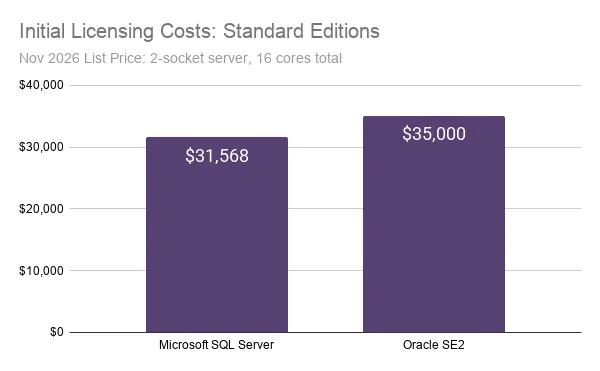
| Microsoft SQL Server Standard | Per core, sold in 2-core packs (4-core minimum) | $1,973 per core | Up to 32 cores, 256 GB buffer pool | $31,568 |
| Microsoft SQL Server Enterprise | Per core, sold in 2-core packs (4-core minimum) | $7,562 per core | No edition limits | $120,992 |
| Oracle Standard Edition 2 | Per occupied socket | $17,500 per socket | Max 2 sockets, 16 CPU threads per database; no extra-cost options | $35,000 |
| Oracle Enterprise Edition | Per processor (2 Intel/AMD cores = 1 processor) | $47,500 per processor | No edition limits; many features are extra-cost options | $380,000 |
For standard edition licenses, initial licensing costs are comparable.
However, for enteprise edition licenses, initial licensing costs can materially differ.
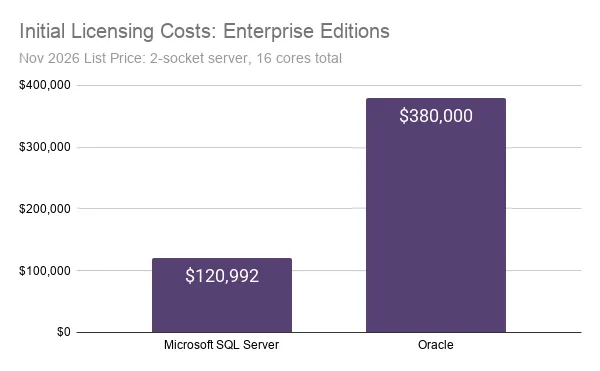
Note: List prices before discounts. Oracle figures exclude extra-cost options such as RAC, Partitioning and Diagnostics/Tuning Packs.
Ongoing licensing costs
The initial purchase price is only the start. Over the life of a database server, annual support usually costs more than the original licenses.
Oracle charges Software Update License & Support at 22% of the net license fee every year. At list price, that is $10,450 per Enterprise Edition processor and $3,850 per Standard Edition 2 socket, plus 22% of every option you own. Oracle’s standard contracts also allow annual increases of up to 8% unless a cap is negotiated, so the bill compounds. Without active support, you lose access to new patches, security fixes and upgrades, and dropping support on only some licenses can trigger repricing of the rest.
By comparison, Microsoft SQL Server offers Software Assurance, at roughly 25% of the license price per year, which adds upgrade rights, free passive fail-over replicas, license mobility, and Azure Hybrid Benefit. One big difference: Microsoft SQL Server cumulative updates and security patches remain available to download without Software Assurance, for as long as your version is in Microsoft’s support life-cycle. You give up new-version rights, not patches.
There are a lot of ways to get creative with both Microsoft SQL Server and Oracle licensing that can change the price and overall landscape dramatically. Examples include Named User Plus licensing for small user counts and Microsoft SQL Server pay-as-you-go for short-lived workloads.
| Edition | Ongoing cost model | Annual rate | Cost, per year | If you stop paying |
|---|---|---|---|---|
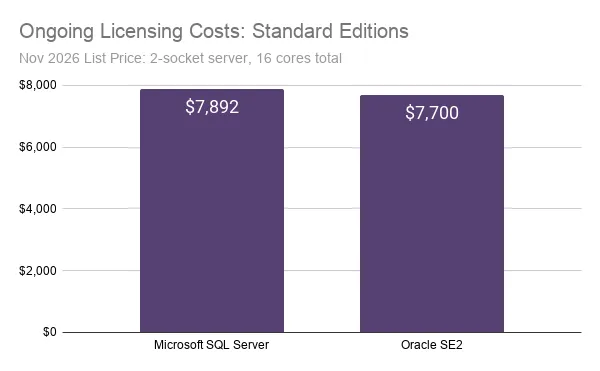
| Microsoft SQL Server Standard | Software Assurance (optional) | ~25% of license price | $7,892 | Keep running and patching your current version; lose new-version rights |
| Microsoft SQL Server Enterprise | Software Assurance (optional) | ~25% of license price | $30,248 | Keep running and patching your current version; lose new-version rights |
| Oracle Standard Edition 2 | Software Update License & Support | 22% of net license fee ($3,850 per socket) | $7,700 | Keep running; lose patches, security fixes and upgrades |
| Oracle Enterprise Edition | Software Update License & Support | 22% of net license fee ($10,450 per processor) | $83,600 | Keep running; lose patches, security fixes and upgrades |
For Standard Edition ongoing licensing, Oracle is currently slightly cheaper than the Microsoft SQL Server equivalent, but comparable.
However, for Enterprise Edition ongoing licensing, the difference, again, is material
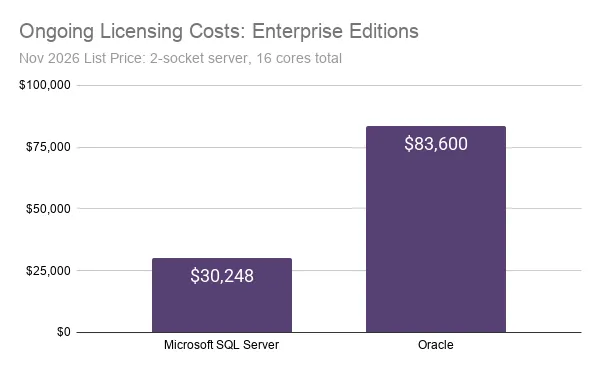
Note: List prices before discounts. Oracle support can rise up to 8% a year unless capped by contract, and options such as RAC carry their own 22% support.
For completeness, it is worth acknowledging Microsoft’s alternative licensing models, including a subscription service and a pay-as-you-go model, both of which replace the initial licensing fee with a higher ongoing fee for access and ongoing support. For some organizations with highly variable workloads, these models can offer helpful flexibility and cost savings. We’ll examine them further in a future post. For more pricing information, check out Oracle’s pricing page and Microsoft SQL Server’s pricing page.
Maintenance costs
Maintenance costs of each platform are difficult to predict. They depend highly on special features and options like RAC, Data Guard, etc. which influence the amount of maintenance required. The frequency and costs of upgrades and patches and the time and effort required to support your system also significantly impact maintenance costs. While DBAs provide business critical support, most companies struggle to afford a full-time database administrator to provide these services. This is why DBA Zone offers fractional, remote database management services to help customers get the coverage and support they need at a cost that makes sense.
Platform and your application ecosystem
The requirements of the applications you run often play a significant role in your decision. For example,
- Microsoft SQL Server fits naturally in Microsoft shops: Windows Server, Active Directory, .NET, Power BI and Azure. It also runs well on Linux and in containers today.
- Oracle runs on Linux, Unix and Windows, and it is the expected back end for Oracle E-Business Suite, JD Edwards, PeopleSoft and many large ERP, banking and healthcare packages.
Many applications require a specific RDBMS and version. In these cases, it’s never worth ignoring that requirement to try and save on licensing costs.
Scalability, availability and performance
Both platforms scale to very large systems. They take different routes to keeping a database online.
| Need | Oracle | Microsoft SQL Server |
|---|---|---|
| Disaster recovery replica | Data Guard (included with Enterprise Edition) | Always On availability groups (basic version in Standard) |
| Readable standby | Active Data Guard (extra-cost option) | Readable secondaries (Enterprise) |
| Multiple nodes serving one database at once | Real Application Clusters (RAC) | No direct equivalent |
| Local fail-over | Oracle Clusterware / RAC One Node | Fail-over cluster instances |
| Large-table management | Partitioning (extra-cost option) | Table partitioning (included in all editions) |
RAC is Oracle’s standout feature for systems that cannot tolerate downtime, such as those in banking, telecommunications, airline reservations, healthcare, and large ERP environments. Most businesses do not need it, and a well-built Always On or Data Guard setup meets typical up-time requirements on either platform.
Quick decision guide
| If this describes you | Lean toward |
|---|---|
| You run mostly Microsoft software and Azure | Microsoft SQL Server |
| Your key application vendor certifies only Oracle | Oracle |
| Budget is tight and the system fits in 32 cores and 256 GB | Microsoft SQL Server Standard |
| You need multiple nodes serving one database for near-zero downtime | Oracle with RAC |
| You run very large data warehouses or high-volume transaction systems | Either — design and licensing decide it |
Don’t decide on your own
At The DBA Zone, we have managed Oracle and Microsoft SQL Server for clients since long before the cloud, and we have no stake in which one you pick. We can objectively review your applications, workloads and current licenses, model the costs of each option, and provide a professional recommendation for the solution that will best meet your needs. We’re also happy to run whichever platform you choose with 24x7 senior DBA support. Reach out if you’re interested in a professional evaluation of your options.